AI UX
A Chat Bubble Is Not a Workflow
Designing the conversation layer for an AI teammate doing real work
Role
Head of Product Design
Company
Silverbee
Duration
Ongoing - early thesis to design partner v1
Problem
A chat bubble could answer questions, but broke the moment the AI had to do real, multi-step work.
Approach
Design a structured interaction layer - plan, progress, checkpoints, artifacts, failure states - that sits between request and result.
Outcome
A reusable CUX model deployed across freeform and curated workflow paths, in active iteration with 25 design partners.
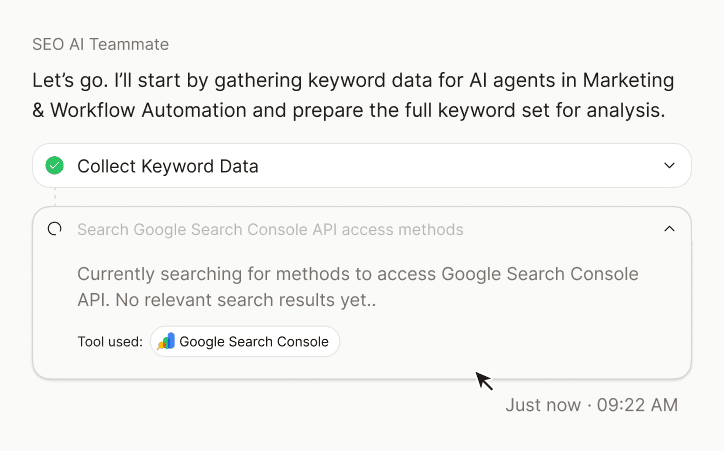
Status (Apr 2026): CUX model deployed across freeform & curated workflow paths - in active iteration with 25 design partners
This case study is the deeper companion to The Manager Seat, which covers the broader product strategy. Here, I want to walk through one specific design decision: what the conversation surface should look like when AI stops only answering questions and starts doing real work.
THE PROBLEM
The moment chat broke
Early on, the AI teammate lived inside a conversational interface - a familiar chat bubble, similar to ChatGPT or Claude. It answered questions well. Users liked it.
Then a design partner asked it to run a content gap analysis on their site against three competitors.
The chat bubble tried.
It produced a long stream of messages. It scrolled and scrolled. Halfway through, the user lost track of which competitor they were on. The output came back as a single wall of text in a chat history. The user couldn't find it again the next morning. They had to ask for it again, and the AI started over.
We watched this happen in three separate partner sessions in the same week.
The chat bubble was not the wrong shape for answering. It was the wrong shape for doing.
MY ROLE
What I owned
I led design for the CUX model - the interaction layer that sits between a user's request and a useful result.
Concretely:
I worked closely with the founding PM, the engineering lead, and a small data team. The hardest debates were with engineering - every checkpoint I proposed added latency or complexity. Some of those debates I lost on the first pass and we revisited later.
THE CHALLENGE
The design challenge in one sentence
How much of the AI's work should the interface reveal?
Too little, and the product feels like a black box. Too much, and the user becomes an unpaid debugger.
The CUX model is a series of design decisions about exactly how much to show, when to pause, and what shape the work takes on screen.
INTERACTION MODEL
The CUX state model
The first design move was to stop treating every prompt the same way.
In a normal chatbot, every message goes through the same pipe: user asks, AI answers. That works for a conversation. It breaks for a workflow that needs scope, plan, approval, execution, and output.
The progression we built around:
Three paths feed into this model:


The point of the classification was to stop overdoing it. Not every message needs to become a workflow. Sometimes the best AI experience is knowing when not to make a big deal of things.
DESIGN DECISIONS
Five design decisions
Five decisions where the obvious answer was wrong, or where we revised after testing. These shaped the surface.
DECISION 1
Plan before action
The strongest trust pattern was also the simplest.
When a request required execution, the AI teammate didn't immediately start. It proposed a plan first.
The plan explained:
Then the user could continue, modify, or stop. Execution never starts in the same message as the plan.
This sounds obvious in retrospect. In the v1 build it wasn't - the engineering instinct was to start work immediately and stream results, because latency mattered. I argued for the pause and lost the argument the first time. We shipped without it. Within two weeks, design partner feedback was unambiguous: "I want to know what it's about to do before it does it." We added the plan checkpoint and the perception of speed actually improved, because users stopped feeling like the AI was racing ahead of them.
DECISION 2
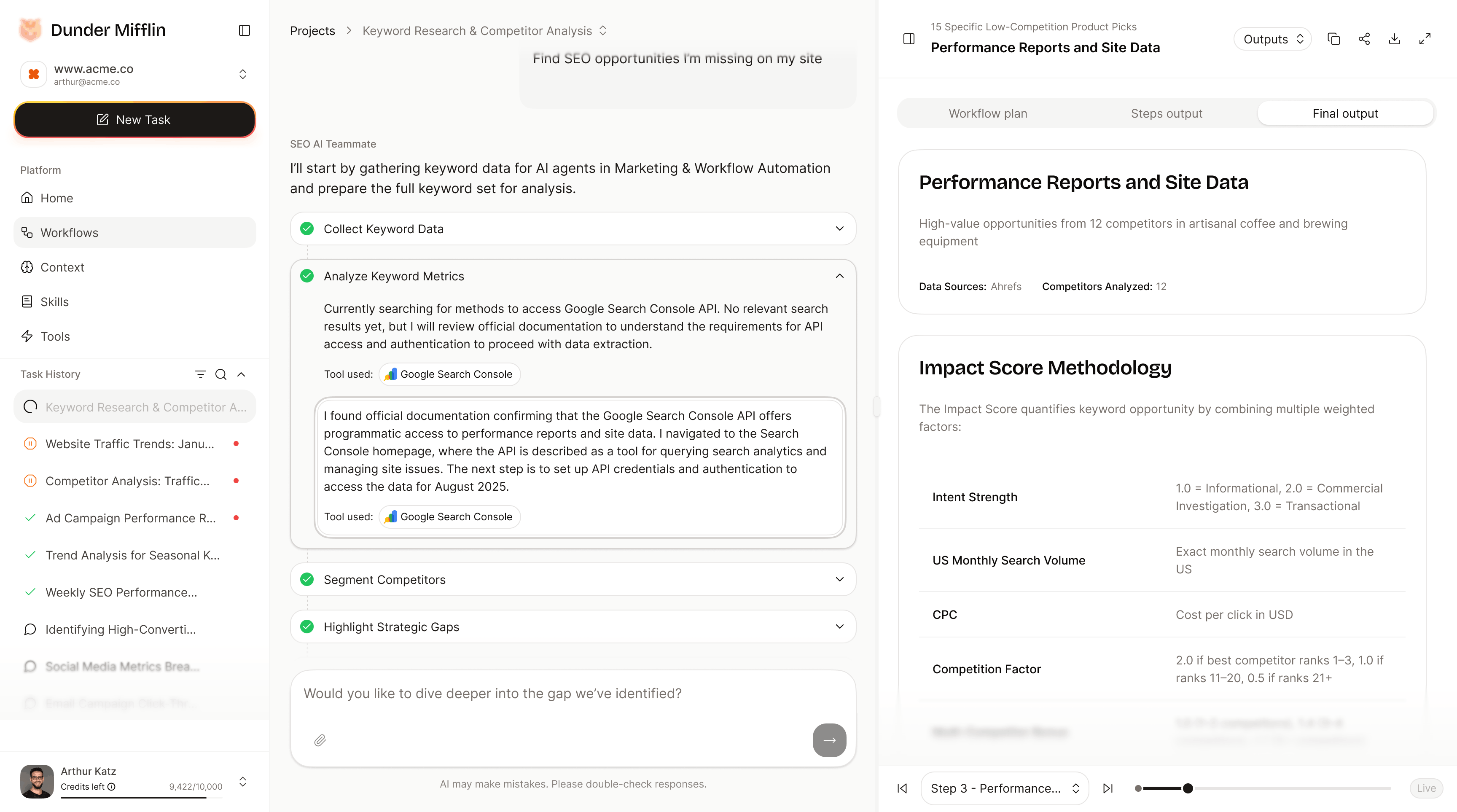
Progress is not a spinner
Long-running work needs visibility. But visibility doesn't mean showing everything.
We used three layers of progress disclosure:
The first version showed everything: every model call, every tool invocation, every intermediate result. Partners told us it felt like reading server logs. The product was transparent - and useless.
The revision: progress is a layered surface. The default view is a clean stage list with the current one highlighted. Users can expand a stage to see step reasoning. They can expand further to see raw tool calls if they need to debug. Three layers, opt-in deeper, never forced.
“Logs are transparent, technically. So is a glass wall. Neither is automatically useful.”
DECISION 3
Outputs are artifacts, not chat messages
A conversation is a poor final destination for professional work.
Users need something they can inspect, copy, refine, share, and act on. The chat thread is not that thing - it's an event log.
So the output doesn't live as the last message in a chat thread. It appears as an artifact in a right-side panel, with the final chat message acting as a handoff: what was produced, why it matters, what to do next.
“The chat explains the work. The artifact is the work.”
This was the design call with the most downstream effect. Once outputs became artifacts, they could be:
DECISION 4
Checkpoints are designed, not error states
AI workflows often need human input mid-execution: a tool needs authorisation, a dataset needs to be picked, a missing input needs to be supplied.
The first version surfaced these as errors. "Workflow paused. Authentication required." It worked, technically. It also made every workflow feel fragile.
We rebuilt these as checkpoints - first-class moments in the UI, not error states. The current stage pauses. A sticky checkpoint card appears with a clear action: Connect, Authorize, Select, Upload, Continue. The workflow resumes when the user acts.
The framing matters. An error feels like the system broke. A checkpoint feels like a natural pause point in real work.
DECISION 5
Failure needs design too
This is the section I'd point to first if I were showing this case study to a senior designer.
AI workflows fail in ordinary ways. A data source is missing. A scraper returns partial results. A tool times out. A user didn't supply enough context. The model produces an output the Lead doesn't trust.
Most AI products treat failure as infrastructure noise - a generic error message, a retry button, an apology. We tried that first. It was the single most damaging pattern we shipped, in terms of design partner trust.
The redesign separated failure into two axes:
Failure type:
Response strategy (chosen by the AI, surfaced to the user):
Each combination has a designed UI state. The user sees what happened, why it matters, and what comes next - not "something went wrong."
“A good AI experience does not pretend failure will never happen. It shows what happened, why it matters, and what comes next.”
METRICS
What's measurable today
- ·25 design partners onboarded
- ·18 weekly-active partners (~72% of cohort)
- ·5 heavy users averaging ~2 hours/day
- ·~45 minutes average daily usage among weekly-active partners
- ·7 low-usage partners being evaluated against ICP fit
- ·78% accuracy for prompt-based responses (model + Lead-reviewed)
- ·≤12% of responses classified as hallucinations after Lead review
- ·65% of free-text queries receiving appropriate routing (chat vs. workflow)
- ·80% of failure states recovered without abandonment
- ·60%+ of weekly-active partners crossing into heavy-user threshold
OUTCOMES
Outcome
The CUX model is now a reusable interaction layer for any AI execution work the product takes on. Adding a new workflow doesn't require rethinking how plans, progress, checkpoints, outputs, or failures should look - those are settled.
It also gave the team a clearer product language:
That language is now the spine of how new product surfaces are designed inside the workspace.
HINDSIGHT
What I'd do differently
The plan-before-action pattern should have shipped from day one. I lost that argument in the first build because of latency concerns, and we paid for it in two weeks of confused user feedback. I should have insisted harder, or shipped a thinner version that proved the value before backing down.
The failure-state library should be design-system-level, not product-level. Right now failure states live in the product codebase. They should be tokenised, named, and reusable across any AI feature anywhere in the company. That's the project for Q2.
I'd test the three-path classification with users earlier. We named the paths internally before we tested whether users perceived the distinction at all. They mostly didn't - and the v1 routing logic over-classified things as workflows. The classification is now ~85% right, but it took two iterations.
Reflection
Designing AI products changes the meaning of simplicity.
Sometimes simplicity means fewer steps. Sometimes it means one more checkpoint. Sometimes it means showing the plan before hiding the complexity. Sometimes it means letting the system stop politely before doing something stupid.
That last one is underrated.
The interface for AI work cannot be only conversational. It has to be conversational, structured, inspectable, and interruptible.
A chat bubble can answer a question. A real AI teammate needs a way to clarify intent, propose a plan, show progress, ask for help, recover from failure, and hand over a useful result.
That's the difference between a conversation and a workflow.