AI UX
A Chat Bubble Is Not a Workflow
Designing CUX for an AI teammate in a stealth startup
Role
Head of Product Design
Duration
Ongoing
Team
Product & Data
Overview
Designing an AI teammate for marketing professionals raises a simple but uncomfortable question:
What should the interface look like when AI stops only answering questions and starts doing real work?
A regular chat interface works well for simple questions. It works less well when a user asks an AI teammate to analyze data, inspect a website, compare competitors, run a workflow, produce a report, and explain what happened along the way.
That is when a chat bubble starts feeling too small for the job.
This case study covers the design of a CUX model - Conversational User Experience - for AI-powered workflows. The goal: help users move from intent to outcome through a conversation that is structured, inspectable, and safe enough to trust.
Not a chatbot with nicer messages. Not a dashboard pretending to be intelligent. A work surface for human-supervised AI execution.

The opportunity
LLMs and agentic tools are changing what users expect from software.
Natural language is becoming more than an input method. It is becoming a way to describe work, trigger workflows, and coordinate tools behind the scenes.
For marketing professionals, that creates a real opportunity. They can delegate more work to AI: SEO audits, content gap analysis, competitor research, reporting, monitoring, recommendations, and more.
But delegation needs trust.
Users still need to understand:
- what the AI teammate understood
- what it plans to do
- what data or tools it uses
- where progress stands
- when human input is required
- what output was produced
- what to do next
The opportunity was not just to make chat better.
It was to design the missing layer between a user's request and a useful result.
The users
The early users and design partners were marketing professionals, with an initial focus on SEO and content roles.
They were not new to tools. Quite the opposite. They were already switching between analytics platforms, SEO tools, spreadsheets, docs, search results, AI tools, and internal reporting.
The problem was not 'these users need more software.'
They needed leverage.
They wanted AI to help with the heavy lifting, but without losing control over the work. That distinction shaped the whole experience.
A bad AI product says:
> Trust me.
A better AI product shows:
> Here is what I understood, here is what I'm going to do, here is where I am, and here is where I need you.
That became the direction.
My role
Leading product design for this area meant turning a broad AI interaction challenge into a concrete experience model the team could build, test, and reuse.
The work included defining the CUX structure, designing the flow from prompt to output, shaping trust and approval patterns, creating execution states, and aligning the experience with product strategy and engineering constraints.
The main design challenge was deciding how much of the AI's work to reveal.
Too little, and the product feels like a black box. Too much, and the user becomes an unpaid debugger.
The design challenge
A normal chat flow has a familiar rhythm:
User asks. AI answers.
That rhythm breaks when the AI needs to perform multi-step work.
For example:
> "Run a content gap analysis for my website."
That request may require clarifying the scope, identifying competitors, accessing data sources, calling execution tools, comparing findings, generating recommendations, handling missing data, and producing a final report.
A single answer is not enough.
The interface needs to support a fuller sequence:
Intent → Clarification → Plan → Approval → Execution → Output → Next step
That became the core of the CUX model.
The CUX model
The CUX model gives structure to AI work inside a conversational workspace.
The system classifies each user prompt into one of three paths:
This classification was important because not every message should become a workflow.
Sometimes the best AI experience is knowing when not to make a big deal out of things.
Principle 1: Plan before action
The strongest trust pattern was also one of the simplest.
When a request required execution, the AI teammate did not immediately start. It first proposed a plan.
The plan explained:
- what the AI understood
- what it intended to do
- what areas it would cover
- what output the user should expect
Then the user could continue, modify the plan, or stop.
Execution never starts in the same message as the plan.
That rule matters. It gives the user a real checkpoint before the AI touches data, runs tools, or produces work based on assumptions.
It changes the feeling from:
> "The AI is doing something. Hopefully the right thing."
to:
> "The AI understands the task, and I can still guide it."
Principle 2: Progress is not a spinner
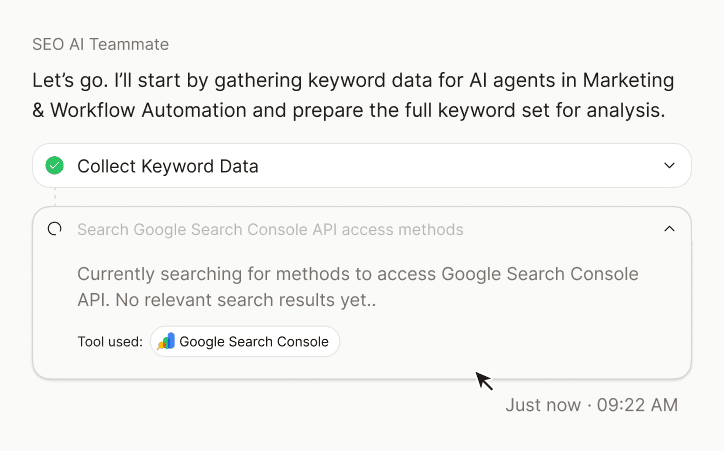
Long-running AI work needs visibility.
But visibility does not mean showing everything.
The execution experience used three levels of progress:
This helped users follow the work without reading technical logs.
Logs are transparent, technically. So is a glass wall. Neither is automatically useful.
Principle 3: Keep the user in control
AI workflows often need human input.
A tool may need access. A dataset may need selection. A workflow may need a file, permission, or decision.
Instead of hiding these moments or turning them into errors, the interface treats them as human-in-the-loop checkpoints.
The current stage pauses. A sticky checkpoint appears. The user takes action: Connect, Authorize, Select, Upload, Continue.
Then the workflow resumes.
This keeps the AI teammate capable, but not reckless.
The user should not have to micromanage every step. But they should always know when their judgment or permission is required.
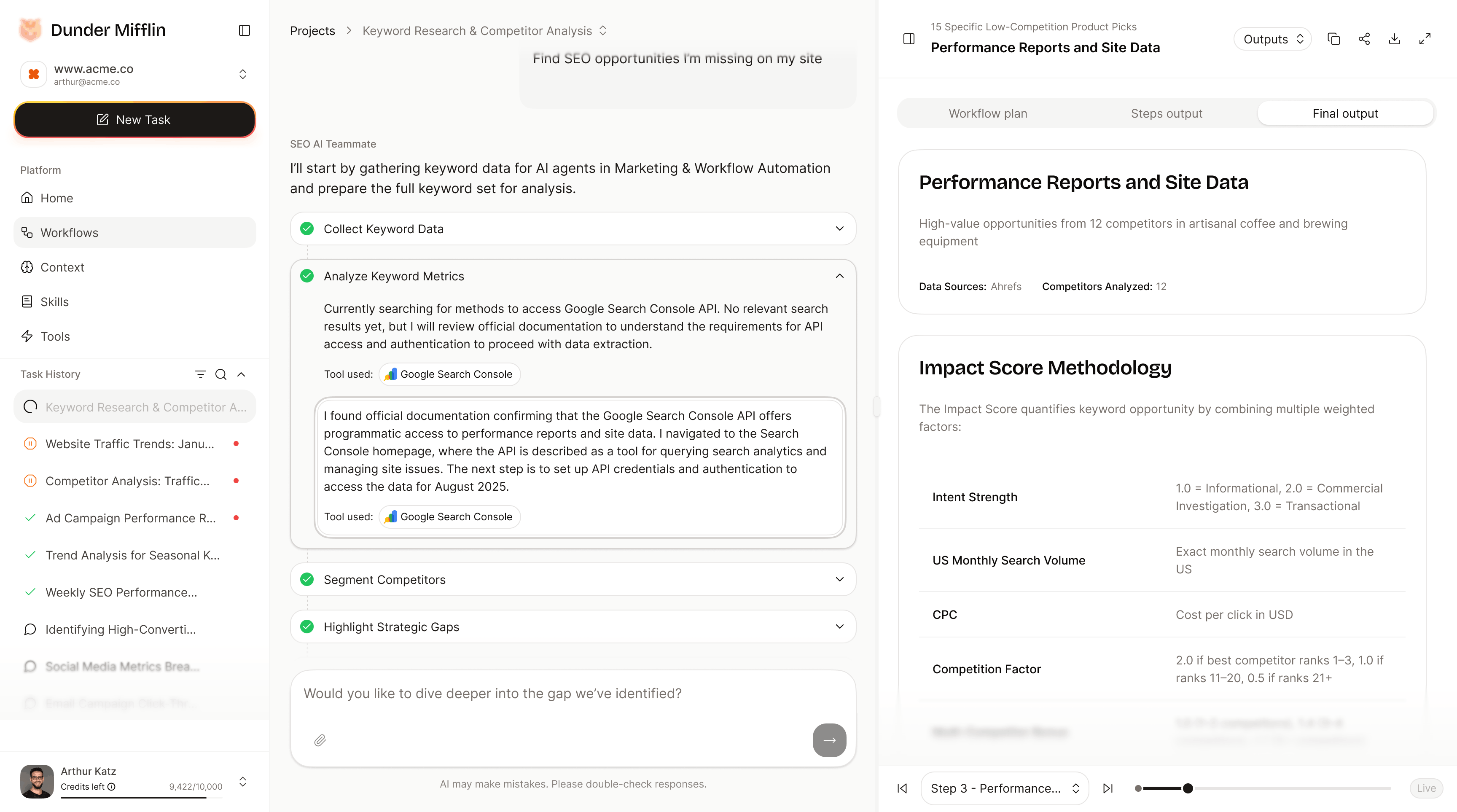
Principle 4: Outputs are artifacts
A conversation is a poor final destination for professional work.
Users need something they can inspect, copy, refine, share, or act on.
So the output does not live only as the last message in a chat thread. It appears as an artifact in the right sidebar, with the final message acting as a handoff: what was produced, why it matters, and what to do next.
That small separation is important.
The chat explains the work. The artifact is the work.
Principle 5: Failure needs design too
AI workflows fail in very ordinary ways.
A data source is missing. A tool returns partial results. A scraper fails. Authentication is not configured. The user did not provide enough context.
The interface needs to explain those moments clearly, without sounding like infrastructure had a rough morning.
The failure model separates issues into two types:
The AI teammate also needs a response strategy:
- continue as planned
- continue with partial coverage
- replan and continue
- stop execution
This is not the most glamorous design work, but it is where trust is either protected or lost.
A good AI experience does not pretend failure will never happen. It shows what happened, why it matters, and what comes next.
Measuring success
The CUX direction was evaluated around trust, clarity, and repeat interaction.
Some of the quality bars and validation targets:
- 78% accuracy for prompt-based responses
- at least 65% of free-text queries receiving appropriate responses
- fewer than 12% of responses classified as hallucinations
- 55% of users asking at least one follow-up question
- 48% of users submitting feedback on responses
- 72% of users managing multiple chats without issues
These numbers mattered because CUX was not just a visual layer. It was a trust layer.
If users understand the plan, approve the work, follow progress, review the output, and continue the conversation, the product starts to feel less like a black box and more like a teammate.
Outcome
The CUX work created a reusable interaction model for AI execution.
It helped define:
- when the AI should answer directly
- when it should ask for clarification
- when it should propose a plan
- when execution should pause
- how progress should be shown
- how tools should be referenced
- where outputs should live
- how failures should be explained
- how next steps should be suggested
The result is a clearer product language for AI workflows: one that combines conversation, structure, transparency, and control.
Reflection
Designing AI products changes the meaning of simplicity.
Sometimes simplicity means fewer steps. Sometimes it means one more checkpoint. Sometimes it means showing the plan before hiding the complexity. Sometimes it means letting the system stop politely before doing something stupid.
That last one is underrated.
The main lesson:
> The interface for AI work cannot be only conversational. It has to be conversational, structured, inspectable, and interruptible.
A chat bubble can answer a question.
A real AI teammate needs a way to clarify intent, propose a plan, show progress, ask for help, recover from failure, and hand over a useful result.
That is the difference between a conversation and a workflow.